
Microsoft Dragon Copilot: What It Is and Who Should Switch
Microsoft Dragon Copilot is Microsoft's AI assistant for clinical documentation. It puts Dragon Medical One's dictation and DAX Copilot's ambient listening, which records a patient visit and drafts the note from the conversation, into one app sold to health organizations. Microsoft announced it on March 3, 2025, and it went on sale in the US on May 1, 2025. Despite the name, it is a separate product from Microsoft 365 Copilot, with its own licenses.
If you use Dragon Medical One and someone has told you it's time to move, here is the short answer. Nothing forces you onto Dragon Copilot by a published date. What stops working after December 31, 2026 is old versions of Dragon Medical One, and the fix is an upgrade that keeps you on Dragon Medical One. Moving makes sense if your organization wants ambient notes. If you only dictate, the new parts are ambient notes and AI editing, both charged per use on the license built for dictation sites, and the time savings that health systems have measured for ambient notes run from none to about 2 minutes a visit, against the 5 minutes Microsoft's own survey reports.
Every product fact below was checked against Microsoft's own pages on November 10, 2026.
What Dragon Copilot does
Dragon Copilot does two jobs that used to be two products.
The first is dictation. You speak and the text appears where your cursor is, in the EHR or another app, as it does in Dragon Medical One. Voice commands carry over, and Dragon Medical One's auto-texts and step-by-step commands come across under new names.
The second is ambient documentation. Dragon Copilot records the conversation with the patient, including orders spoken during the visit, and turns it into a draft note in the format of the clinician's specialty, which the clinician reviews and finishes. Microsoft's documentation tells users to get the patient's consent before recording, and says that if a patient says no, the clinician can still record after the visit is over.
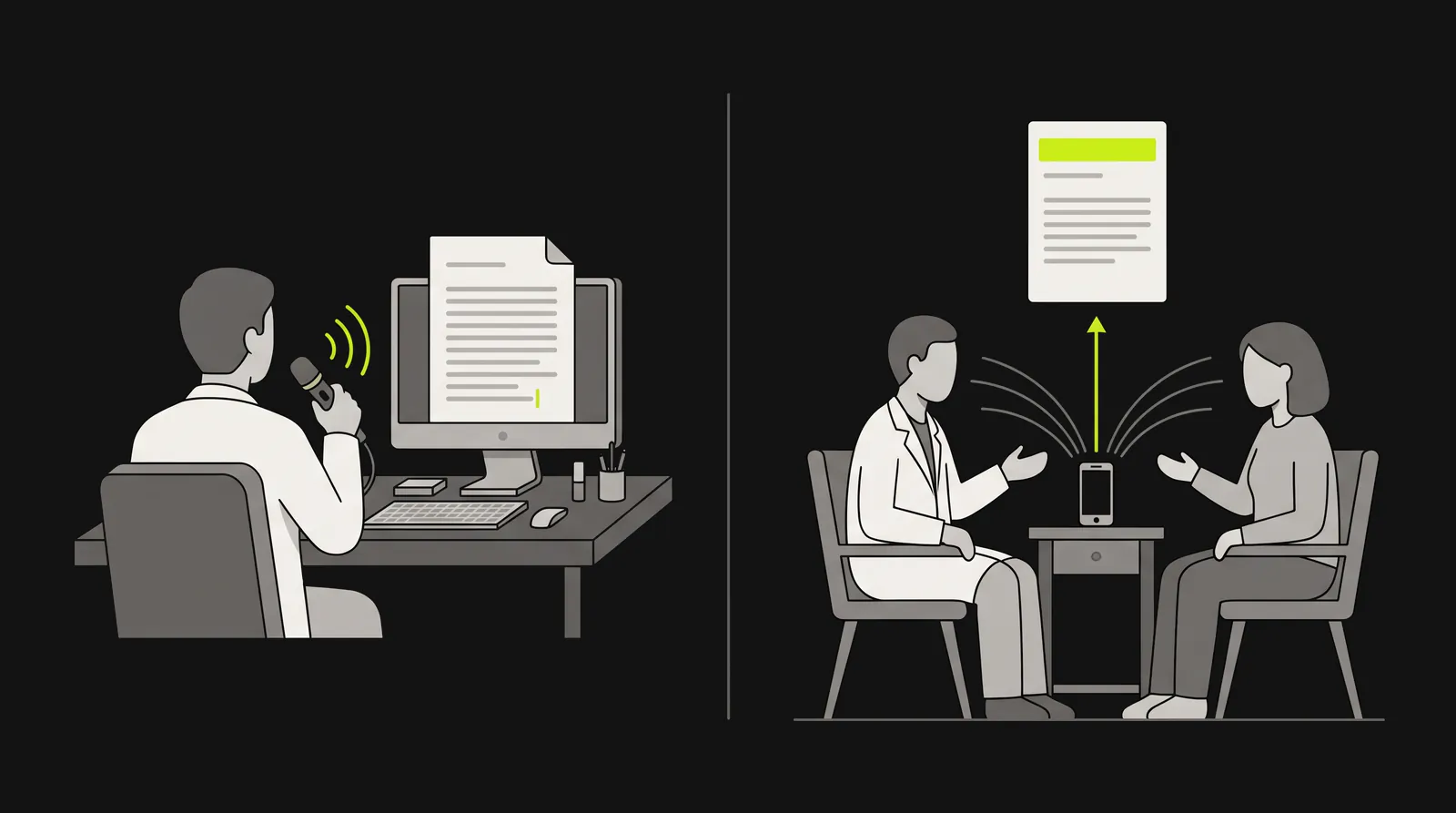
Dictation types what you say where your cursor is. Ambient documentation records the patient visit and drafts the note from the conversation.
The AI features work on both. A clinician can ask questions about the draft or change it in plain language; Microsoft's example for reporters at launch, as CNBC reported, was "Can you add the ICD-10 codes to the assessment and plan?" It drafts referral letters and after-visit summaries, suggests codes, and answers questions from the transcript, the notes and third-party medical references, with citations. The Windows desktop app also works at the cursor in other programs, as Microsoft described in March 2026: select text in the EHR, Outlook, Word or a browser, say or type an instruction such as "Expand this paragraph", and the rewrite lands in place.
Microsoft sells it in three versions, by role:
- Physicians. Dictation, ambient notes and the AI features, in a desktop app, a web app, a mobile app, or embedded in EHRs such as Epic.
- Nurses. Ambient capture that turns what a nurse says at the bedside into flowsheet entries, in EHR mobile apps such as Epic Rover or in the desktop app. Microsoft set US general availability from December 2025.
- Radiologists. A companion to PowerScribe One that summarizes prior reports and can add AI-drafted report content, in preview for US PowerScribe One customers since November 2025. Our PowerScribe explainer covers the reporting system it attaches to.
DAX, DAX Copilot, Dragon Copilot: the names, in order
DAX Copilot is the older name for what is now Dragon Copilot's ambient half. Nuance sold dictation and ambient documentation as separate products for years, its ambient line went from DAX to DAX Express to DAX Copilot, and Microsoft, which bought Nuance in 2022, merged dictation and ambient in 2025. That history is why people still search "Nuance DAX" and "DAX Copilot", and why Microsoft's support site still has DAX Copilot guides. Those cover the older setup, where clinicians on Dragon Medical One opened DAX Copilot inside the PowerMic Mobile app on iOS; the quick start guide notes that "There is no app called 'DAX Copilot.'" Here is the history, with a source for every date.
| Date | What happened | Source |
|---|---|---|
| February 24, 2020 | Nuance makes Dragon Ambient eXperience (DAX) generally available. It records the exam-room conversation, and human reviewers are part of the process | ID Tech, Healthcare Dive |
| March 31, 2021 | Dragon Medical Practice Edition, the installed desktop product, stops selling in North America. Support ends March 31, 2022, and Nuance points customers to the cloud-based Dragon Medical One | Nuance notice, via a reseller |
| March 4, 2022 | Microsoft completes its purchase of Nuance | Microsoft |
| March 20, 2023 | DAX Express announced: ambient notes drafted in seconds with OpenAI's GPT-4 | Microsoft |
| September 27, 2023 | DAX Express renamed DAX Copilot and made generally available, fully automated | Healthcare Dive |
| January 18, 2024 | DAX Copilot embedded in Epic becomes generally available | Healthcare Dive |
| March 3, 2025 | Dragon Copilot announced, combining Dragon Medical One and DAX Copilot | Microsoft |
| May 1, 2025 | Generally available in the US, then Canada on June 1, 2025 (Quebec later) | Microsoft |
| September 4, 2025 | Launched in the UK | Microsoft UK |
| October 7, 2025 | Launched in Ireland | Microsoft |
| October 16, 2025 | Nurse version announced, generally available in the US from December 2025 | Microsoft |
| November 24, 2025 | Radiology version enters preview for PowerScribe One customers | Microsoft |
| February 1, 2026 | A Physician Practice offer for small and mid-sized practices launches through Microsoft's partners, capped at 100 licenses per customer | Microsoft Partner Center |
| May 1, 2026 | Microsoft lowers the per-user list price, ends the Physician Practice offer, and starts charging ambient and AI use per encounter | Microsoft Partner Center |
| December 31, 2026 | Dragon Medical One LTSR 2021.4.5 and earlier versions stop working | Microsoft Learn |
Do Dragon Medical One users have to switch?
Not by any date Microsoft has published. Microsoft does want Dragon Medical One customers to move. Its Dragon Medical One page has a section headed "Migrate from Dragon Medical One to Dragon Copilot", and its licensing documentation recommends one license type for "Health systems transitioning from Nuance Dragon Medical One, that need lower upfront cost with usage-based billing." But none of the Microsoft pages we checked gives a retirement date for Dragon Medical One itself: not the product page, the documentation hub, the upgrade guide, the feature comparison, or the licensing pages. Microsoft still ships it, too: the Dragon Medical One 2026.3 release notes are dated September 2026.
The date that matters is December 31, 2026, and it is about software versions, not the product. Dragon Medical One runs on two release tracks: the current one, and a Long Term Service Release (LTSR), version 2021.4.5, kept for organizations that needed more time. Microsoft's upgrade guide says: "LTSR version 2021.4.5 and earlier versions stop working after 31 December 2026, as the Dragon Medical One cloud system blocks them."
To check your version, look at the lower-right corner of the Dragon Medical One sign-in screen. If it starts with 2021 or earlier, your IT team needs to upgrade it before the end of the year. The upgrade keeps you on Dragon Medical One. It needs Windows 10 or later (Microsoft recommends Windows 11), .NET Framework 4.8 and Microsoft Edge WebView2.

After December 31, 2026, Dragon Medical One LTSR 2021.4.5 and earlier stop working. Upgrading to the current release keeps you on Dragon Medical One.
The same deadline shows up in a sales offer, which may be what you heard about. Microsoft partners are offering existing Dragon Medical One customers up to 90 days of Dragon Medical One at no charge when they buy Dragon Copilot and commit to a full migration, with the offer scheduled to end December 31, 2026. The terms on one partner's page are worth reading before signing: the same clinician can't use both products at once, and the Dragon Copilot purchase "is non-cancellable and stays payable", so the 90 days are not a trial. (Terms from eDist's offer page as indexed by search on November 10, 2026; a second partner, dictation.cloud, describes the same offer.)
What carries over if you do move
Microsoft's feature comparison (updated September 8, 2026) says what moves across and what isn't there yet.
| In Dragon Medical One | In Dragon Copilot |
|---|---|
| Auto-texts | Migrated, now called "texts". Plain text only for now; formatted text is listed as coming soon |
| Step-by-step commands | Migrated, now called "workflows". Desktop app only |
| Vocabulary | Migrated. Not used during ambient recording yet |
| User settings | Migrated. Some advanced options, such as certain keyboard shortcuts and some transfer controls, aren't available |
| Voice commands | Most are available; some formatting commands aren't |
| PowerMic and SpeechMike buttons | Configurable |
| PowerMic Mobile | Replaced by a phone mic built into the Dragon Copilot mobile app, for iOS and Android |
| Dictation Box | Replaced by a "dictation clipboard" that holds several dictations, desktop app only |
| Dictating in Epic Haiku | Not available |
Where it's available and what it runs on
Microsoft's Dragon Copilot page lists, as of November 10, 2026:
- Physicians: the United States, Canada, the United Kingdom, Ireland, France, Germany, Austria, Belgium, the Netherlands and Switzerland.
- Nurses: the United States.
- Radiologists: preview in the United States.
Physicians can use it four ways. The desktop app runs on Windows 11 and Windows Server. The web app runs in the latest Microsoft Edge or Google Chrome. The mobile app is on iOS and Android. And it can be embedded in an EHR such as Epic. There is no Mac desktop app, so on a Mac you use the web app. (Dragon Medical One itself reaches a Mac only through Citrix or by running Windows on it, in a virtual machine or Boot Camp, according to Microsoft's Mac guidance.)
For dictation, Microsoft's setup guide names the PowerMic III and 4 and the Philips SpeechMike as typical dictation microphones. For ambient recording it suggests the Dragon Copilot mobile app on a modern phone, or, where an organization wants a dedicated device, one built to pick up several speakers, such as a conference speakerphone certified for Microsoft Teams, because dictation mics are designed to hear one voice and suppress the rest.
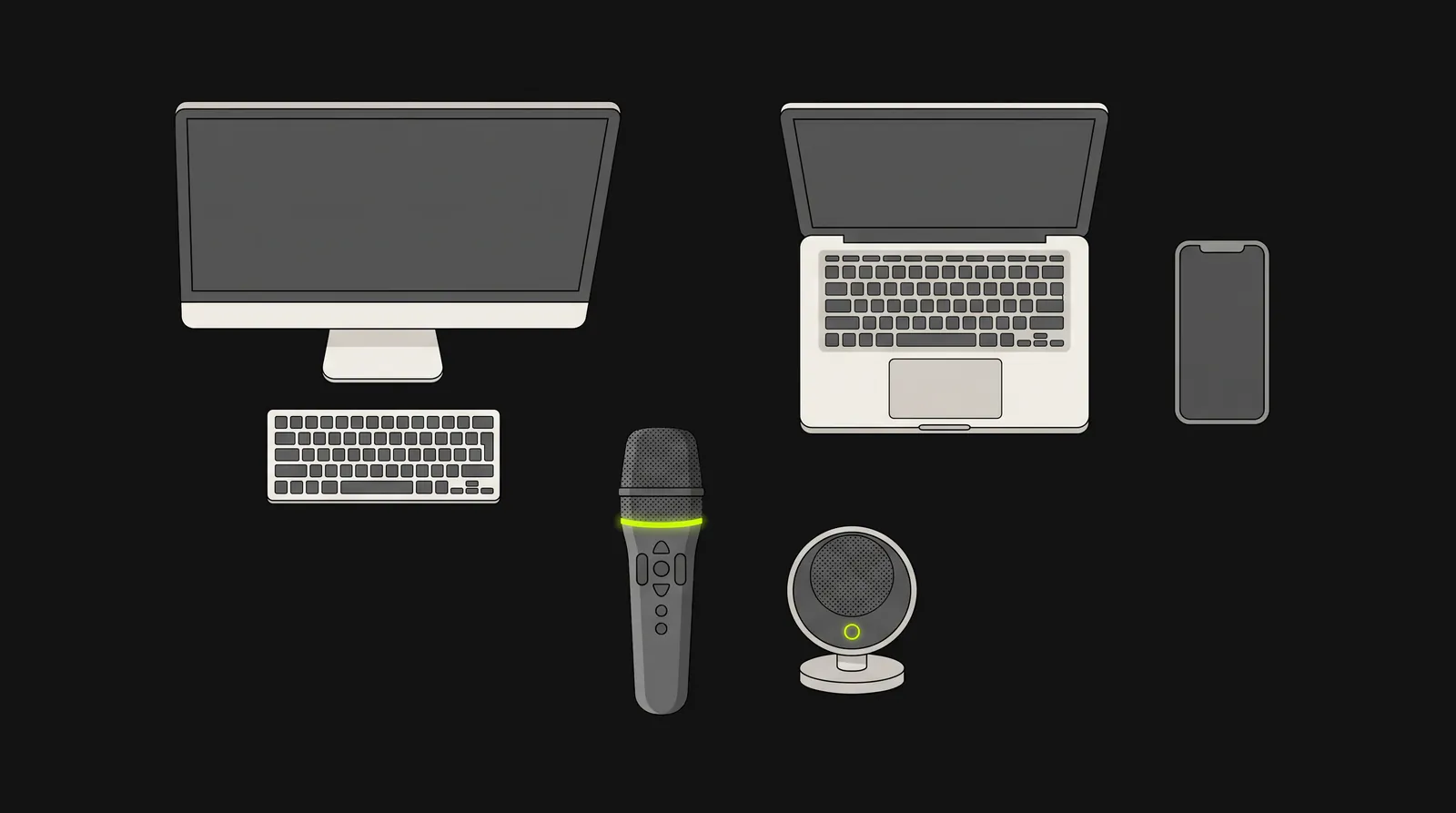
Dictation microphones are designed to hear one voice. For ambient recording, Microsoft suggests the mobile app on a modern phone, or a device built to pick up several speakers.
Who can buy it, and what it costs
Dragon Copilot is sold to organizations, directly by Microsoft or through Microsoft-certified partners. An administrator assigns licenses in the Microsoft 365 admin center and sets the product up in Dragon admin center. Partners price it per user with no published minimum, on 1-year or 3-year commitments. For physicians there are two license types:
- Per User. Every feature, including dictation, ambient recording and the AI features, for one monthly fee per user. No Azure subscription needed.
- Flex. Dictation for a monthly fee per user. Ambient and AI features are switched on for individual users and charged per use through an Azure subscription the organization links to its Dragon environment.
Microsoft publishes the per-use rate in its licensing guidance: since May 4, 2026, an AI-assisted session costs 25 consumption units at 0.01 dollars each, which is 0.25 dollars, and each Flex license includes 10 sessions a month. A session covers every AI feature used in it, and editing text by voice in another app counts as one. The license prices themselves aren't on Microsoft's pages, but partners publish the US list prices by Microsoft's product code.
| US list price (1-year commitment) | What it includes | |
|---|---|---|
| Physician Flex | $60 per user a month billed annually ($720 a year); $63 billed monthly | Dictation, plus 10 AI-assisted sessions a month |
| Physician Per User | $150 per user a month billed annually ($1,800 a year); $157.50 billed monthly | Dictation, ambient and AI with no per-use charge |
| Each AI-assisted session over the 10 on Flex | $0.25 | Charged through Azure |
License prices from o365hq's price list (Microsoft product code CFQ7TTC11MM7) and Secureframe's MSRP listing for Flex, checked November 10, 2026. These are list prices; a partner's quote can differ.
Two things follow from the table. First, on annual billing, Flex catches up with Per User at 370 AI-assisted sessions a month (60 dollars plus 360 paid sessions at 0.25 dollars is 150 dollars). That is about 18 ambient visits a day over 20 working days; a clinician recording more than that pays less on Per User. Second, a Flex seat used only for dictation lists for about half of Microsoft's own price for Dragon Medical One: 60 to 63 dollars a month against 123, or against 99 for Microsoft's Dragon Medical One and PowerMic Mobile bundle. That is the pitch a Dragon Medical One customer is likely to hear. Our Dragon Medical One price guide covers those prices.
Small practices had their own offer for three months. Microsoft launched a Physician Practice offer on February 1, 2026, sold only through partners and capped at 100 licenses per customer, and it reached end of sale on May 1, 2026 when Microsoft cut the list price of the standard per-user license.
Does ambient AI save time? What the studies found
Microsoft's launch announcement says clinicians using its ambient AI report saving 5 minutes per encounter, and that 70 percent report less burnout and fatigue. Both figures come from Microsoft's own survey of 879 clinicians at 340 organizations using DAX Copilot, in July 2024. Health systems that deployed DAX have since measured the time in their EHR logs. The savings they found run from nothing that could be told apart from chance to about 2 minutes an appointment. Even the two randomized trials disagree: UCLA's found no real difference for DAX Copilot, while Providence's smaller one found 1.7 minutes per appointment.
| Study | Who, what and how | Time on notes | Use and well-being |
|---|---|---|---|
| UCLA Health, NEJM AI, 2025 | Randomized trial: 238 physicians in 14 specialties given DAX Copilot, Nabla or usual care, November 2024 to January 2025 | DAX: 23 seconds less per note, against 18 seconds less for usual care, not significant. Nabla: 41 seconds less, a 9.5 percent bigger drop than usual care | DAX used in 33.5 percent of visits; about 15 percent of physicians given a scribe never used it. Burnout and task-load scores pointed to improvement, which the authors say needs confirming |
| Providence, Future Healthcare Journal, 2025 | Randomized, staggered start: 24 high-burden family medicine providers who volunteered, DAX, June to December 2022 | 1.7 minutes less per appointment than the late-start group; 2.5 hours less off-hours documentation a week | Burnout and frustration fell |
| Intermountain Health, JAMIA, 2024 | 99 outpatient clinicians in 12 specialties using DAX, March to September 2022, compared with matched controls | Documentation time fell from 5.3 to 4.5 minutes per patient (significant); controls didn't change significantly. After-hours EHR time rose significantly | Median use 47 percent among active users; engagement trended up |
| Atrium Health, NEJM AI, 2024 | 112 primary care clinicians using DAX Copilot from mid-2023, compared with 103 clinicians over 180 days | No significant change in EHR time or financial measures; small drops for heavy users and family medicine | Use reported by subgroup |
| Penn Medicine, JAMA Network Open, 2025 | 46 volunteer clinicians in 17 specialties, DAX Copilot, 5 weeks of use, before and after with no control group | 10.3 to 8.2 minutes in notes per appointment; after-hours work down 30 percent | Easy to use; mixed feedback |
| Providence, JAMA Network Open, 2026 | 1,547 active users of DAX Copilot, 2024 to March 2025, each compared with their own months before | About a quarter of a minute (0.26) less note time in the first month; after-hours time fell gradually | About 8 percent of the system's clinicians became regular users |
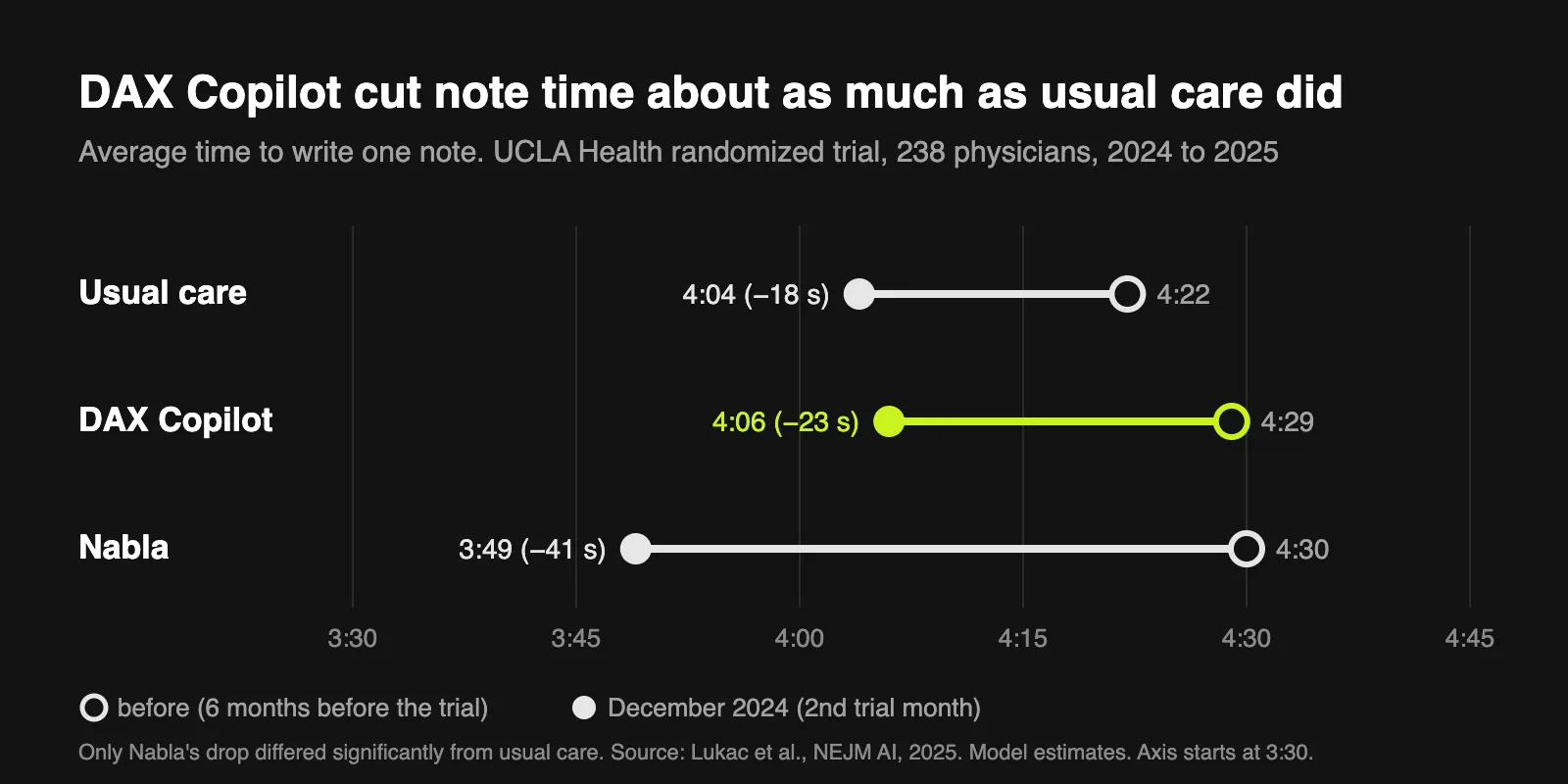
The randomized UCLA trial is the cleanest test of DAX Copilot, and in seconds its result is small. A DAX physician's average note took 4 minutes 29 seconds before the trial and 4 minutes 6 seconds in its second month, while physicians on usual care went from 4 minutes 22 seconds to 4 minutes 4 seconds. The difference DAX made was about 5 seconds a note, and the trial was designed to detect a difference of about 44 seconds. The usage rate stands out as much as the timing. These physicians were given the tool and an hour of training, and they turned it on for about one visit in 3. At Providence, where licenses were offered to every physician and advanced practice clinician, about 8 percent became regular users, meaning 25 or more visits in at least one month.
Three things cut the other way. The UCLA trial lasted 2 months, and its authors saw note times keep falling from November to December, which may mean a learning curve. Every study above tested DAX or DAX Copilot before the Dragon Copilot release, and the software has changed since. And the well-being results are a real signal: the UCLA authors write that the scribes may help physicians "whether accompanied by efficiency gains (Nabla group) or not (DAX group)", and Providence's small randomized study found burnout fell.
The drafts still need reading. UCLA's physicians reported clinically significant inaccuracies "occasionally", most often omissions, structural problems such as unwanted formatting or too much detail, and pronoun errors. We found no published randomized trial of Dragon Copilot itself as of November 2026.
Who should switch, and who shouldn't
Dragon Copilot is a good fit for:
- Health systems with many conversational visits, such as primary care, emergency and outpatient clinics, that want ambient notes and accept that the measured time saving is a minute or two a visit at best, with the clearer gains in how clinicians feel.
- Organizations on Epic or another EHR Dragon Copilot embeds in, with an IT team to run Dragon admin center, Azure billing if they choose Flex, and a patient consent process.
- Dragon Medical One sites that want one app for dictation and ambient instead of two.
It adds less for:
- Clinicians whose notes are dictated, not spoken with a patient in the room. Radiology reports, operative notes, letters and discharge summaries have no conversation to listen to, and the radiology version is still a preview. What they gain is AI editing at the cursor, which counts as a metered session on Flex.
- Solo clinicians and small practices, now that the small-practice offer has ended. No minimum seat count is published, and a small buyer gets the same admin setup a health system uses.
- Clinicians on a Mac without Windows, who get the web app only. Microsoft describes AI editing at the cursor as a feature of the Windows desktop app.
If you're on Dragon Medical One and you only dictate, the practical step is the version check above. Upgrade if you're on 2021 or earlier, and weigh Dragon Copilot separately, on its price and on what you'd use.
If you only need dictation
Dictation Daddy is a dictation app, not an ambient scribe. You press a key, speak, and the text appears wherever your cursor is: an EHR field in the browser, a desktop EHR, or a letter in Word. It doesn't record the visit, write a note from a conversation, or integrate with Epic or any other EHR. It types into them.
For a clinician moving off Dragon, these are the parts that matter:
- 98 to 99 percent accuracy from your first sentence, with no voice training. That is a benchmark figure for the speech models it runs on, as our medical dictation page notes.
- Mac and Windows apps, an Android keyboard and a Chrome extension; the iPhone app is coming soon. On a Mac it runs natively, with no Citrix or Windows virtual machine.
- Philips SpeechMike and Nuance PowerMic work on every plan, on Mac and Windows. Our SpeechMike setup guide walks through connecting one.
- Medical terms work out of the box, and paid plans let you add your own words to a custom vocabulary.
- It costs under 100 dollars a year, and your first 100 dictations are free with no credit card required.
The tradeoff is that Dictation Daddy needs an internet connection and uses cloud processing, so your audio does leave your device.
A user who goes by Wtin, and who also has Dragon Medical, wrote to us: "While I have other voice dictation programs, including Dragon Medical and Dragon One, I'm mainly using yours now." Full disclosure, you are reading this on the Dictation Daddy website, so we are a little biased. See what real users are saying.
The bottom line
Dragon Copilot is where Microsoft is taking its Dragon medical customers, and for a health system that wants ambient notes inside Epic, it is the obvious product to evaluate. For one clinician, four facts matter more than the launch figures. Microsoft hasn't published a retirement date for Dragon Medical One. The December 31, 2026 cut-off is fixed by upgrading Dragon Medical One. Health systems that measured DAX found savings of zero to about 2 minutes a visit, not 5. And a Dragon Copilot license runs 720 to 1,800 dollars a year at US list price, billed annually.
If dictation is the part of Dragon you use, you can keep dictating for less. Try Dictation Daddy free.
FAQ
What is Microsoft Dragon Copilot?
Dragon Copilot is Microsoft's AI clinical assistant, launched in 2025. It combines Dragon Medical One's dictation with DAX Copilot's ambient listening, which drafts a note from the recorded patient visit, plus AI drafting of letters and summaries, AI editing at the cursor and answers to medical questions. Microsoft sells it to health organizations for physicians, nurses and, in preview, radiologists.
Is DAX Copilot the same as Dragon Copilot?
DAX Copilot was Nuance's ambient scribe, generally available from September 2023. Since 2025 (announced in March, available from May) its ambient listening has been part of Dragon Copilot, which adds Dragon Medical One's dictation in the same app. Many people still say "DAX Copilot" or "Nuance DAX" for the ambient part.
What is the difference between Dragon Medical One and Dragon Copilot?
Dragon Medical One is dictation: cloud speech recognition that types where your cursor is, from a Windows app. Dragon Copilot includes that dictation and adds ambient notes from recorded visits, AI-drafted letters and summaries, AI editing, and web and mobile apps. Auto-texts, step-by-step commands, vocabulary and settings migrate from Dragon Medical One.
Is Dragon Medical One being discontinued?
Microsoft hasn't published a retirement date for Dragon Medical One on the pages we checked in November 2026, and it shipped release 2026.3 in September 2026. What ends is support for old versions: Dragon Medical One LTSR 2021.4.5 and earlier stop working after December 31, 2026, and upgrading to the current version keeps it running.
How much does Dragon Copilot cost?
At US list price, a Physician Flex license is 60 dollars per user a month on an annual commitment (720 dollars a year) and a Physician Per User license is 150 dollars a month (1,800 dollars a year), according to partners' price lists in November 2026. On Flex, ambient and AI use costs 0.25 dollars per AI-assisted session after 10 included each month, Microsoft's published rate since May 4, 2026. A partner's quote can differ from list. For Dragon Medical One prices, see our Dragon Medical One price guide.
Is Dragon Copilot the same as Microsoft 365 Copilot?
No. Microsoft 365 Copilot is the AI assistant in Microsoft's office apps. Dragon Copilot is a clinical documentation product built on Nuance's Dragon Medical One and DAX Copilot, sold and licensed separately to health organizations.
Can an individual doctor buy Dragon Copilot?
Only through a Microsoft partner. Partners price it per user with no published minimum, on 1-year or 3-year commitments. There is no app you download and pay for yourself, and the license is managed through Microsoft 365 admin center and Dragon admin center like any organization's. Microsoft's separate offer for small practices ran only from February 1 to May 1, 2026.
Does Dragon Copilot work on a Mac?
Yes, through the web app in the latest Microsoft Edge or Google Chrome. The desktop app, where Microsoft describes AI editing at the cursor in other programs, runs only on Windows 11 and Windows Server, and the mobile app is on iOS and Android.
Which countries is Dragon Copilot available in?
For physicians: the United States, Canada, the United Kingdom, Ireland, France, Germany, Austria, Belgium, the Netherlands and Switzerland. The nurse version is US only, and the radiology version is in preview in the US. These are from Microsoft's Dragon Copilot page, checked November 10, 2026.
Last checked: November 10, 2026, against Microsoft's Dragon Copilot and Dragon Medical One pages, Microsoft Learn, Microsoft's licensing guidance and Partner Center announcements, and partners' US price lists.
Ready to try it?
Turn your voice into polished text
Free for your first 100 dictations. Works in every app. No credit card required.